




Mastering Audio: Pro Techniques
Out of the hundreds of reader questions we have answered during Hit Talk’s first year, perhaps none is more persistent than how to attain a hotter, better-mastered mix. It’s a persistent question because attaining a bold, big sound requires inspired production wizardry and skill at every single stage of the music-making process - from recording, to picking samples, to mixing and equalizing, right down to this tip’s topic: the final master.
Good mixing and good mastering require good monitoring, preferably with a properly-positioned 2.1 system. Maybe you’re skeptical, but you can tell when someone has mixed without a sub. Either they’ve overcompensated in the bass range, or they have no idea how flat their mixes are. So, be forewarned that this tip (and good production in general) requires quality monitoring. It’s also wise to familiarize yourself with Hit Talk’s online and email tips, as well as Hit Theory, to get a better sense for some of the processes that come before this final stage. With those qualifiers out of the way, here’s a tutorial illustrating what we consider a sound approach to mastering your final mix. You can follow these steps with any comprehensive software or hardware mastering set-up, but for this tip, we’re using IK Multimedia’s most praiseworthy T-RackS 3 deluxe mixing and mastering suite.
T-RackS Linear Phase EQ Settings
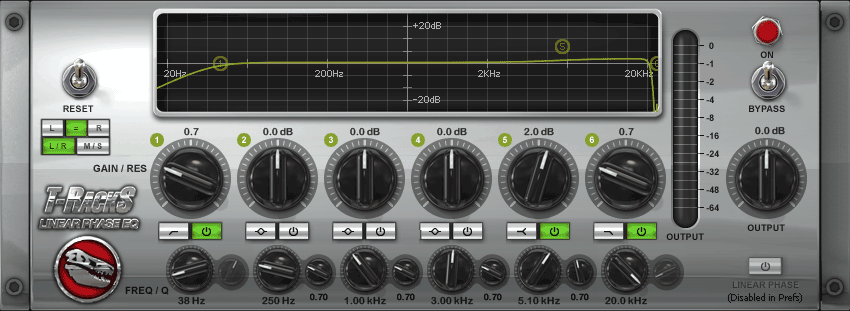 No matter what gear you’re using to master your final mix, always start with the EQ. The first link in our signal chain is the new, and exceptionally transparent T-RackS Linear Phase EQ. Since we’re using a compressor and clipper later in the signal path, we’re going to bypass them for now, and slightly reduce the EQ’s output. Now we’re ready to audition the changes we’re about to make to the final mix’s frequency response.
Now, you may wonder “Why start with an EQ instead of a compressor?” It’s not an arbitrary decision. You start with the EQ because you’re going to be processing the signal with a low cut filter. You thereby drastically reduce the compressor load, giving it far more leeway to process the mids and highs. Above, you can see that the low cut filter starts to roll off at 38Hz. Now, while you might think twice about shaving off those precious bass frequencies, there’s a balance to be struck between bangin’ bass and hot, punchy compression. Ask yourself, how hot do I want the overall mix, and how heavy do I want the bass? You can’t have both. Typically 37-38 Hz is a good compromise between cutoff frequency and compressor output. Heavier production styles, like what you hear from Timbaland or Lil Jon, often have plenty of heavy bass elements, like 808-style kicks and deep analog bass timbres. In those cases 38Hz might be too much, so you have to be careful. Again, tri-monitoring is a must. Listen carefully with your subwoofer to strike that perfect balance.

Another factor to pay attention to while you’re tweaking your low cut filter is the slope of roll-off. The roll-off slope is illustrated above at the left side of the EQ’s display (see above.) If you’re using T-RackS 3, try using a range of 35Hz up to 41Hz, as we’ve done in the above illustration. However, if you’re using a different EQ, think of that range as a guideline, mainly because your roll-off slope could be steeper. A steeper roll-off means a more abrupt decibel drop below the cutoff frequency, so a 38Hz low cut filter on another EQ could make a much more drastic difference than in the T-RackS Linear Phase EQ.
Outside of using the EQ’s low cut, and as long as you have a good mix, the EQ should need little if any tweaking. At ModernBeats, when we master our product demos, we rely on our mixing skills to create a balanced frequency spectrum. If one demo needs it, we boost the treble range by small increments (between .5dB and 4dB - see above graphic). If you absolutely have to boost low or mid frequencies, make sure the linear phase EQ is set to “Linear Phase,” to keep EQ coloration to a minimum. As with any mastering process, you want this one to be completely transparent.
Transparent Master Compression
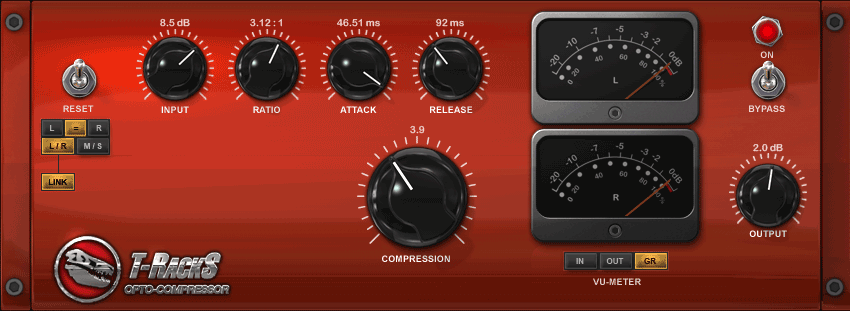 Whenever mastering a final mix, the object is transparency and punch. Start with a modest compression ratio, about 3:1. If you’re trying to compress, not limit, a 3:1 ratio keeps the compression clean. Attack time should also be carefully managed for transparency. A fast attack will give you an artificially snappy sound. If you’ve mixed carefully, you’ll want to bring out the original snap and dynamics - all the good stuff you accomplished while mixing. If you go too slow on the attack (say, above 56ms) then the compressor just won’t react. The T-RackS Opto Compressor’s longest attack setting is 50ms, and usually we don’t pull it below 45ms, because the dynamics of the mix start to gain that artificial snap. Sometimes you have to use a fast attack while mastering to manage distortion and overdrive. If you’re hearing a lot of out-of-control peaks, often shortening the attack time can clean them up. Again, listen carefully and trust your ears.
Use a release time range of 84-105 ms. A longer release than that usually means that you’ll hear the compressor working. If you’re a dance or trance/goa producer, and you’re not averse to cliché, then by all means use a long release and savor the “boom-woaah, boom-woaah”. But if you’re producing urban and hip hop, keep your compression release respectably smooth. If your release is too short, you’ll hear distortion in the bass range; It’ll start to crackle. If your release is too long, the compressor will not recover and you’ll hear that pumping and breathing.
Next up is “input level,” (”input drive” in the T-RackS Classic Compressor.) You have to make sure your compression isn’t squashing your signal, and, in T-RackS, the best way to monitor the level of your compressor is by using the VU meter. While you’re playing back your song, look to see if the black VU meter averages around -5 dB. Generally, it shouldn’t dip down to -10. Watch it for a few seconds and get a visual idea of the signal’s average (RMS) level.
You may decide to swap the T RackS Opto Compressor with the Classic Compressor, which gives you a stereo enhancement option. Your best bet though is to set both compressor modules to equivalent settings and get an idea of which one suits your mix better. Regardless of the module you’re using, try following our guidelines above. If your mix is good, these techniques will make it shine all the brighter.
T-RackS Clipper Settings
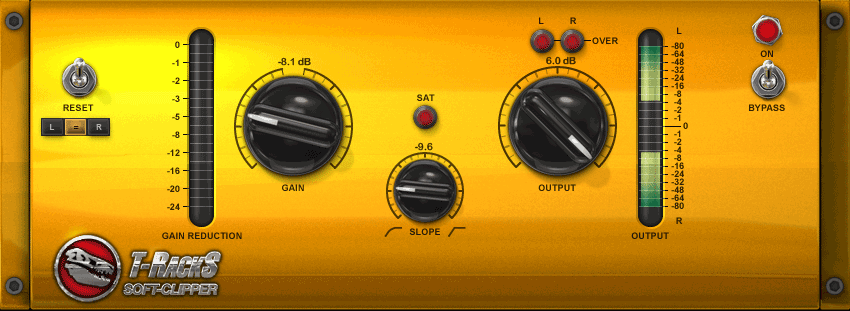 Our approach to the clipper is simple, and follows the logic of setting gain and volume on a mixer board channel strip. First, turn the slope and gain knob hard left. While keeping the slope knob all the way to the left, bring the gain knob up as high as you can without triggering any saturation.
Once you find the optimum gain, which should be fairly low because the compression gain will already be quite high, now turn the slope knob up until you find a timbre you prefer. Putting the slope knob right in the middle, at about a -6 setting should yield a nice, smooth saturation. You can’t really mess with the clipper until you’ve finished compressing and EQing. If you decide you need to tweak your compressor or EQ, turn the clipper off, and repeat the steps we just explained.
Some Final Bass Mastering Tips
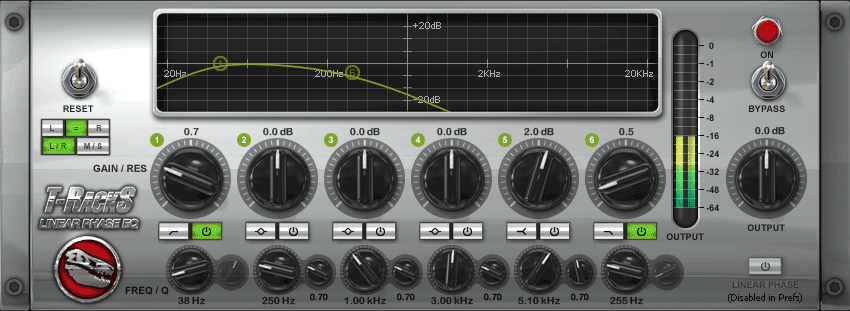 Now that you have tweaked, pruned and polished the relevant parts of your mastering chain, take another look at the EQ. In the picture at left, we’ve taken the hi cut (or low pass) filter and swept it all the way down to 250Hz. Now don’t panic, we’re not suggesting you wipe out all of the mid/treble frequencies in your mix. You’re sweeping to 250Hz so that you can hear the bass frequencies in isolation. Hearing those bass frequencies on their own allows you to monitor for crackle.
If the bass is crackling, then the output of the EQ is too high. You can’t hear those rumbles and crackles if you’ve got guitars vocals and synths blaring over the top of them. You can afford a little bit of crackle, but too much of it can sap your mix’s tone. Once you’ve set the right output level, simply bypass the hi cut filter.
Experiment with Mixing and Mastering
With these guidelines, you can take your mixes from a dull shine to a glittering shimmer. Again, you still need all the elements of a catchy, well-mixed beat: properly managed frequencies, expansive stereo image, good composition, good arrangement, etc… No amount of mastering will ever replace mixing skill and musical creativity.
Our final mastering advice is, simply, experiment. Like any of our advice, use this tip as a guideline, then take it in your own unique direction. For example, now that T-RackS 3 can be downloaded as a suite of independent VST plugins, you can create your own hybrid mastering process using any other set of mastering plugins. If you really want a distinguished sound, you might decide to route your final master through a hardware graphic EQ to shave off your bass frequencies, then back into your DAW for the final mastering stages. It’s up to you.
T-RackS 3 provides a convenient all-in-one suite incorporating the very best digital models of classic vintage mastering tools: one of the many reasons we used it for this tip. But, regardless of what plugins or hardware you’re using, if you’ve been looking for a fatter, fuller sound, a proper mastering regimen like the one we’ve outlined above is essential. Have it ready for action.
 GET 20% OFF COUPON INSTANTLY W/ SIGN-UP!
 Check Out Hot Artists & Music Producers discovered through Song Submit!



Hey guys the question I have is how does the EQ for R&B music work? I’m using Pro Tools LE 8 and on the master fader for all my tracks I always have the EQ set up for that type of music (Hip Hop,Techno,etc). So using Pro Tools EQ 3 7 Band what are the frequencies I should set for R&B music? Also what levels should they being setting at (+ 2.0 Db,- 1.0 Db etc)? This is before the vocals are put in place to have it set up to be recorded. This is all generally speaking by the way not pin point specific. Thanks loads guys!!
Hi John,
Well… as you can imagine it depends on the voice. You may try a rolloff between 100-150 Hz… Be careful when you’re boosting a voice, as some EQs have a bit of coloration. The voice might not need too much alteration either. If you’re not just worried about voice, but also about bass, then it becomes a whole different story. You might find some helpful hints in the Right Round and So Sick Hit Reports as well.
I have emu system. What software should i use for quality beat making?
Hi Matthew,
When you say you’ve got a E-mu system are you referring to (hardware), a sampler like the SP-1200 you wanted to track?, or something else like a keyboard or a Audio/Midi Interface you wanted to use?. E-mu have had a fair share of hardware and software products over the years.. What ever the case be there’s lots of software you can use for quality beat making, Ableton Live, Cubase and Logic are all good programs and all have unique things they can do, I’d say try get a demo of one of them programs or even all three and give them a go.
I hav emu patchmix. I use fl 7 for my beats and sonar 3 for d vocals. I usually export d beat from fl 7 to sonar. But when it gets to sonar, it doesn’t sound tight and rich and the overall production from sonar doesn’t sound nice. A friend told me to start using cubase sx if i need a better production. Pls advice me. What do I have to change about my studio?
Hey what’s going on Hit Talk. I need se assistance if you may. Right now I have cubase LE 4 as my main recording software but I make my beats in fruity loops. I am planning on upgrading to Pro Tools in about another month or so but I would like you to tell me how I would go about mastering my beats in Cubase. In the contrary my beats sound fairly good because I mix them in fruity loops but I do not use any effects or EQ’s. I have a few of my beats on my music myspace page if you could check them out a review them please. (www.myspace.com/nighthouseent) My name is Skillz aka D.K.
hey tnx
r u suggesting using EQ on vocals too?
Yes, 7khat, try using a bass rolloff filter on your vocals. Vocals shouldn’t need excessive processing in the higher frequencies. Definitely use a rolloff or hi-pass on your vocal tracks, tho. A lot of un-needed bass frequencies can creep in and sap your output.
D.K.,
Try rewiring FL into Cubase. If that doesn’t work you should be able to export tracks as individual wave files and later import them into Cubase. Mixing in Cubase is like mixing in any multitrack sequencer with a mixer section. Just make sure you’re using EQ and compression with wisdom. that’s the key to mixing. And if something’s not coming through the way you want it to, don’t just boost it, consider what you might trim back in the rest of the mix to bring that element out. Those are some general tips.
HT
Yo, Matthew You can also rewire FL into Sonar if you are working with vocals in conjunction.
Hi John. It is a e-mu sound card. It is fixed as an internal sound card into my system. I dont hav a keyboard. I depend on FL piano roll
Hey Matthew,
The program you use is really down to personal preference, I’ve never used Sonar myself so i couldn’t comment on that but i would say rewire your tracks out of FL like Emmanuel mentioned, if you’re not getting on with Sonar then give Logic or Cubase a look over. Apart from that the problem you’re having in your studio could be down to your monitors, sub or room acoustics. If you have good monitors and sub in a 2.1 set up then make sure you have the sub crossover at about 80hz, and keep the EQ boosts off the speakers,(the flatter the frequency boost of the speakers the better you mix will come out). Also sign up for the free Production tips and get Hit Theory if you haven’t already, that’ll help you heaps.
Hope that helps
im at tanzania,im using cubase sx for making beats,but the sound is at low level so how can i increase it without affecting the dB level(without red clip)?
Hi Sajo,
A good mix is key in increasing the overall dB output. To achieving a good mix there are a number of tools you can use, compression and Eq are the most common tools in any mix. For example, you may have a bass resonating around 40-100Hz along with a kick resonating say 80-150Hz, there will be a conflict of frequencies 80-100Hz you could easily solve with Eq, or you might even have a instrument track with lots of different peaks going thru it you could even out with compression. Along with audio maximizing and panning this will help in achieving a louder overall output.
Hope that can help a bit.
Hi Sajo, Try getting your self some mastering vst plugins or if you have them all ready. check out http://www.kvraudio.com or http://www.kjaerhusaudio.com, Download install Load Cubase SX and route them to your master mix channel.
If your going for the commercial route then I would suggest IK-Multimedia T-Tracks 3, which only cost an arm and a leg. Always start with an EQ first for a master mix and then Compressor and so on etc…
Have you read the tutorial above try following that to?
LOL Hi, John we submitted a Comment a the same time for the same question regarding Sajo’s question. ;)
I’m hear helping to LOL. hope there isn’t noting wrong by helping answering some questions too ;)
Peace
Yo Emmanel,
Lol, it’s all good man.. two heads are better than one, you’ve put some helpful posts up too.
Peace bro
Well yeah HT I can import my beats into cubase with no problem but they are only mixed down so I need to master them so they can have a louder output and so that they can be ready to be recorded on. All the beats I made does not have any compression or EQs added to them but they don’t sound bad at all but I’m sure they would sound professional if I add the EQs and compression. Are there any general compression or EQ frequencies that go rather good with bass kicks?? Or is there anything I could use as a reference guide??
Sajo’s is a good question.
Sometimes it’s not the main mix, necessarily, that’s the problem. Some transient sounds will make the signal clip. This takes limiting at the input stage. (not just at the mastering stage) That’s one thing we would add.
example: you’ve set the gain on your mixer or interface so that your guitar doesn’t clip during recording. But once it’s recorded, you have a new problem: all the transients are really loud, and all the tones are really quiet. At this point, you can do what Emmanuel suggests and use a VST compressor, but rather than route to the main mix, you can use the compressor on individual channels that contain strong peaks. Use a high compression ratio to limit. This will also give more character to snaps and claps that you record in your own home.
And also, if possible, it’s good to limit with a quality hardware compressor (as opposed to a VST compressor routed to your guitar channel, for example) You’ll end up with more information in the signal; cleaner signal, and most often a lower noise floor, too.
Thanks a lot guys,im going to try as what you have advice me,by the way i want to know how can i make gatin(like beat of love in this club) in cubase coz i know to make it in fl studio.so how can i make it using plugin in cubase?
i would like also to know how can i build a home recording studio?i mean how to fix the walls so that no external sounds can be penetrating,also is it neccessary to have a window for a recording room?
Hi Sajo,
Building a high quality home studio can range up to $1,000- $3,000, but all depends on the equipment. Protools HD Studio rack ups to 10,000-40,000 or more. But you can build one at a budget. try looking at Youtube.com and type in how to build a recording studio. That should give an idea of what you need and how to build a home studio.
The main thing is your acoustics try getting some studio foam. Here’s an idea: http://www.guitarcenter.com/Acoustic-Treatments-Studio-Furniture.gc
It all depends on what you want but it’s not necessary to have a window for the booth, most people that built home studio’s use their closet for a vocal both, padded in the inside with studio foam. You get to make sure that the room is dead or sound proof. You would also need the foam for the main room for your studio monitors too, and bass traps. Make your you shop around for some good flat response reference monitors which is the main key of a good mix, also your ears too. Hope this helps…;)
Emmanuel
Yo, D.K
Number one thing is make sure you don’t have your (low’s) gain up high which I’m talking about bass, 808 kicks etc.. it will distort and over power the whole mix. And for that reason you could not master a song if the bass is crank up high, can’t really hear the high’s and mid’s.
I highly recommend EQ and Compression in the mix. That way you can cut and correct frequency conflict’s and also make some instrument’s brighter. If you want your kick’s to knock, Then I would suggest adding a compressor on them, which give’s that punch sound like Kanye West.
Another thing’s is I wouldn’t recommend mastering your beat yet if your going to add vocal’s to it. If master the beat and the vocal’s are low and then master the whole track, it will be over mastered, or over compressed and so on, which it will sound distorted. I recommend mastering after you record the vocals.
Try signing up for 10 Free Music Production Tips, which talk’s about EQ & Compression. Hope this help’s
Emmanuel
Ok thankz alot Emmanuel!! I know exactly what you mean. This is kinda how I’ve been doing it all along. I’ve been making sure that my basslines or kicks or 808 kicks are up just enuf to hear the bang but not too much to drown out the rest of my instruments and percs.
I just wanted to make sure I was on the right track as far as the mixing and mastering. But this definitely helped alot. Good looking out yall and HT these tips will boost my production, knowledge, and skills up a whole lot. I’ll be checking back in with you guys later. Oh and yes I’m going to download the tips also.
If you guys would like to comment or give advice on some of the beats we have posted, check them out. We would greatly appreciate the professional help from all of you. Thankz.
Yo Sajo,
You may also have a look at this article from Remix.
HT
Not sure why, but Emmanuel’s reply to Matthew got re-directed to another post. Here it is:
Hi, Matthew, Are you tracking out the beat from FL 7 and bouncing each track into Sonar or are you importing the whole beat as one stereo file in Sonar. As from my experience there’s no sonic difference as in sound quality in any major DAW, for as Cubase SX, Logic Pro, Sonar, Protools LE, Live etc… Plus choosing a DAW is primary base on user preference. If you do, make sure you have flat response reference monitors and I good audio interface. I personally own Sonar myself as my primary DAW, and I have no problems what so ever. I urge you to upgrade if you want to stick with Sonar. The lasted version is 8.3.1. From what I heard that Cubase handles VST’s more effectively than Sonar and other DAW ’s because Steinberg is the original inventor of VST (Virtual Studio Technology), but every DAW has it’s own different’ versatile capability’s, but keeps it’s same principle’s far as midi and audio recording. Plus read some of the comment’s on this page related to this subject. But bottom line choosing a DAW is based on user preference. Hope this helps
Peace, Emmanuel
Hi Emmanuel. I usually export the whole beat from fl7 as one stereo wave to sonar.
Your comments on Mastering using the IK Tracks system are praise worthy.
Do you have any recommendations as to how someone can set up a series / parallel flow as achievable in the T-Racks shell?
In Sound Forge it appears to be purely series based flow, and the same in Wavelab.
Dual Sends in ACID are neither an option, nor are is it an option in FL Studio.
Any advice would be appreciated.
Thank you
Kevin
Hey Kevin,
Thank you. Glad you found this tip edifying. You can do parallel, then series in T-Racks 3… you’re looking for the opposite, though? What is it that you’re looking to do, exactly… or maybe this is a trick you’re keeping to yourself? (;
Yeah, most consumer DAWs do series only for the most part. Ableton Live and some others allow you to stem mix tracks… ah, but that doesn’t do it either, cuz you need series first… Oh! wait a minute… if you’re using T-Racks 3, you can use the individual modules (each module can be downloaded as its own VST plugin) on a single channel for your series chain, then after those on the same channel you can use the full T-Racks 3 suite to provide you with a parallel signal path. Problem solved!
Indeed your creative thinking resolved the challenge, with T-Racks deluxe and the separate pluggins you have better mastering processing abilities because there is no gain stage in between each pluggin.
The audio stream is time aligned and at the same db level as per the other chain, until a biased output is applied simply by reducing output of the previous processor.
This a way to parallel EQ and parallel compresson on discrete audio files, which may include samples or complete songs.
Meen…i use fl 7 to make my beats, i put som effect lik reverbs,flanger etc just to giv the beat my required output..i think i just hav talents for putting instruments together and givin them a good melody….but i dont know nothing about mastering…pls how can i master a beat and how do i know a well mastered beat becos truthfully i really dont notice any difference in quality btw wat i do and wat i here from international artists beats…i really need your help.
Cuematic,
The differences are difficult to hear unless you have a good monitoring system, like we said in the article. Chances are if you’re not hearing any differences between your work and, say, Just Blaze’s work, then you probably need better monitoring headphones or proper reference monitors. That, or you’ve already got all the gear you need, and you’re just really good.
Hi , i need to be clear about compression. I use fl studio 8 mixed with sonar8, adobe audition 3. I have many different compressor plugins. But don’t have the perfect using knowledge. Can you help me out?
Hi Jack,
The following book…Alex Case FX - look it up on Amazon is a great resource for learning how to use compression.
Also if I were you I would purchase one really good DSP compressor and absolutely master it. Learn how each knob effects the other parameter, in other words begin to understand the co-dependence of parameters. One of the amazing details of realistic analog compressors is the relationships between parameters. Accurately emulated DSP compressors attempt to do this.
Personally, I have been spending more time doing comparitive mixing and experimenting with different EQ methods and using compression where necessary.
All the best,
Kevin
***
Yo Jack,
I can help you with that. The three DAW’s your working have a compressor plugin that work’s pretty much the same as any compressor’s. Compression can be used to add punch or snappy sound to your drums like kick’s, snare’s etc… Compression can also be part of mastering, depending on the application your doing. It can also add power to your mix and your can apply it to vocal’s so that your vocals don’t peak.
Check out this previous post here: https://www.modernbeats.com/hit-talk/compress-hip-hop-beats/
This talk’s about how to compress drums right to the point.
Remember a compressor is a very powerful tool so do not abuse it, over compressing will result overpowering and ruining your mix.
Emmanuel
Thanks guys.
how can i compose a beat with two different tempos?i mean that,i may start with tempo 90 then after some few bars i want to change my tempo to 100,am using cubase sx,advice me on what to do?
Provided that you have a well defiend beat with transients that can lock to a grid and is also sensitive to BPM definition, i.e. REX or ACID files, you can simply automate your tempo.
Many DAW software environments have a tempo map that can accept time line based changes.
In Cubase you can define a tempo change at particular location and then another change with respect to another location.
Quantized audio, REX and or ACID is the best bet.
A few tools for people working on tracks are really valuable…
Recylce from Propeller Head (use this to make REX files)
Sound Forge From Sont Creative software (use this to make ACIDIZED files)
You can also feed all of your audio to a Sampler and then reconstruct the production entirely with midi triggered events. Using this technique you will be able to take advantage of how MIDI will respond to Tempo maps.
I am sure the Cubase manual and or forums will have extended information regarding this principle.
Regards,
Kevin
Thanks for that comment, Kevin. Sajo, in Cubase there should be a tempo track editor - just double click the timeline that indicates tempo, and drag it to the appropriate tempos…
I use Fl8 and hypersonic 2 as a plugin 4 instruments and a few flp packs and av no problem in mixing, my beats sound great but they are not as loud as the tHITS know even after compression…..i need an extra 6db loudness without distortion…Pliz help! I am in Nbi Kenya.
Watts up guys D.K. here again I have a quick question for anyone who kould help me. I have an M-Audio Oxygen 61 and I was wondering if there was a way to program the sounds and kits that I have into my keyboard such as an MPC you kan load the sounds into the instrument kan I do that with my keyboard?? I work with fl6 cubase le4 and ableton live 6 PLZZ HELP.
Hi D.K
Unfortunately this is not possible because the keyboard you have is just a midi controller, not a keyboard or synthesizer that house it’s own sounds onboard.
You can though use the controller to mimic or manipulate the sounds on your computer, like (VSTi) virtual instruments and control music software applications. You can also use the controller for hardware instruments like the MPC, Motif XS and so on…
MIDI (Musical Instrument Digital Interface) is industry standard for creating digital music. MIDI is not sound, it is the protocol and information send from your midi keyboard in to the computer and from the computer back in your midi keyboard. It’s also musical note information when you record a melody or any keyboard performance into a DAW Digital Audio Workstation, which is a music sequencer that can handle audio and midi recording and editing. Audio is the sound you hear Midi is the recorded information.
Emmanuel
Hi, D.K
Another thing is that you can make and program presets with your M-Audio Oxygen have you read the manually yet. If you don’t already have it,l try downloading Enigma
Enigma is a software application that you can use to program you m-audio midi controller, if you need help I will be gladly to help you.
Here’s the keyboard manual
You might want to read your DAW manuals as well.
Hope this helps,
Emmanuel
Dammit!! Excuse my language guys. Thankz alot though emmauel. I asked the guy b4 I bought the keyboard kould I do that and he told me yes. So this means I have to go back and buy another keyboard that isn’t a midi controller?? Bekause this keyboard so far has only worked with the presets that were already in cubase.
Ok thankz alot emmanuel man. I’m going to get started on that and I’ll be sure to check back in with you as soon as I encounter a problem.
Yo D.K.,
You don’t necessarily need to buy a sampling keyboard. You would need something like a Korg M3, or an ASR-10, but it’s going to be far more expensive than your controller. It sounds like your salesman has either misunderstood you, or he just made a wrong assumption, but yes, anything labeled controller will only send MIDI, and will not resample.
An alternative to buying expensive sampling keyboards is using VST samplers.
1)If you’re using FL Studio 6, you might can resample using the “directwave” VST plugin. If that’s not included in 6 (I think it’s only included in FL8), then
2) try going to kvraudio and finding yourself a mappable VST sampler. One example of a commercial sampler is Native Instruments Kontakt… There might be a free VST sampler… if you were using Reason 2 or above, you’d be able to use the NNXT sampler.
3) export all the sounds you want to trigger via keyboard to wave format (or if they’re already in wave format, just locate them in your file browser)
4) map them to the vst sampler. There’s a great example of this in Hit Theory which goes into more detail…
But yeah, controllers won’t do it.
Ok kool thankz HT I’ll try that option also and get back to you if I have any problems. So as far as my midi controller goes watt kan I do with it pertaining to music production kause that’s watt I bought it for and it seems to only play out the preset sounds in cubase but watt else is there yo do with a 61 key controller that doesn’t load other sounds into it’s software??
A midi controller is a fantastic workflow gizmo. Usually there are transport controls (start, stop, record buttons). There are also knobs and faders that you can use to control various aspects of your samplers, synths and DAWs… you just have to research your manuals to figure out how to best integrate the controller - search for the phrase ‘midi learn’. It’s all about increasing your speed and productivity. Don’t forget the pitch and mod wheels, velocity sesitivity and aftertouch. There are so many excellent advantages that come with a midi controller.
Ok. I’m on it thankz HT and Emmanuel I’ll be back soon.
Watts up guys. I downloaded enigma for my laptop but I had no luck. Idk why but enigma would not open but the software supports my laptop. But then again the reason for that may be bekause I have a windows 7 vista laptop and m-audio has not set out a web release for my laptop to be kompatiable with the oxygen 61 midi kontroller. I’m not sure how long it’ll be before they have that ready and I need a keyboard that kan help me with my music production and start making my drum sounds. You guys have any other advice for me?? Greatly appreciated
Yo D.K.,
You might think about installing XP… For the most part, Vista is a gnarly mess of an OS when it comes to music production.
HT
Yeah I thought about that. How would I go about downloading XP??
You’ll need to consult your computer vendor on getting XP installed.
Ok. Would that be easier than just buying new music production software for vista??
It’s a tough call. You’ll have to check out your options and see what’s less expensive. Also, your options will be broader if you revert to XP, as you’ve already seen. Apparently Vista compatibility has improved since it was first released. Though we don’t have much experience with it here.
Ok thankz alot. I’m going to look into I appreciate your help
Good luck.
windows xp sp3 — is available from newegg.com
In my opinion I would buy XP SP3 and run it on system made tt run Windows 7 Professional 64 bit. So that when your DAW of choice and the tools you depend on are ready for W7 64 you can then leverage the same work flow, but employ larger memory cache.
Also a really powerful sampler than can get the job done is SampleTank, it is not ultra - glossy like Kontakt, but really you can do mult-timbral and you can map the parameters to a controller and to some extent expressive your sounds a bit more, Sampletank also has basic converterso that you can convert wave to the native sample tank format.
I use it, and I also have Kontakt, and I must say they have disadvantages and advantages over each other.
Hi. I’ve got a very big problem of a certain hiss sound in between the silences of my wave forms. I’ve tried controling my output levels form my mixer and my external synthesizer keyboard, but the sound is still present. How can I achieve a quiet and clear recording without receiving other sounds either from the equipments I’m using or the computer controling them?
Buy a high quality gate from DBX and set it to close to the threshold of the audio hiss.
Settings
fast attack
Fast release
Transparency and reactive settings is key so a high quality unit is very important.
am using cubase for voice recording and mixing. but my mixing is not sonudin well, i wil like u to explain the effect aspect. thanks
Hi DavePro
Could you give a brief description of your set up and signal chain?. The “Hiss” you’re picking up could from a number of sources, also when recorded waves come in does the Hiss completely disappear?.
Hi,
What would you reccommend for vocals to get the most professional sound? Wouldyou EQ? Use compression?
Yo Moc,
Thanks for the interest. The only way to get a professional sound is to get a perfect signal right from the source. Your toolkit should include the following:
1) a quality recording space, or isolation booth
2) a pop filter
3) a quality condenser mic
4) a quality preamplifier
You may also want to use some outboard compression to limit the input signal, but it’s not absolutely necessary. Just watch your meters (wherever they happen to be) and make sure you’re not clipping.
EQ and compression during post-production should be minimal if they’re needed at all.
Espionage:
Go to a really good studio, bring a friend or a singer.
Pay to have some vocals recorded
Try your best to understand the signal path, through capture process, the edit process, the DSP process.
LEARN LEARN LEARN
Conduct some cost simulations of what it would take to acheive a desire level quality. Look at some channel strip options, some vocal processing options, some microphone options.
Learn the art of de-breath, de-essing, techniques just dont use software or you will never learn…
Buy the acapella to a great song, and just listen to it, ask some fundamental questions about the quality, the levels, the editing, etc.
Learn, Learn, Learn,
That is the only way to make it happen.
Hello,
I have a little problem, I can make the track/beats that i feel at that time but my main problem is that i don’t have a network of places for people to let me know if what i am producing is any good or not. some time in 2010 i would like to submit some of my work but b4 i do i need another set of ears so to speak. i have a set up a free site
for now so for any one who reads it pls check it out under the songs tab and leave a comment there or here this is the site address thx ahead of time..
www[dot]wix[dot]com/slipmedia/Sik
considering joining warbeats dot com
it has a brilliant interface for reviewers to judge your music
Hey sik,
Genuine potential in your sounds. We’ve sent you an email with a few pointers. Hope it helps.
Regards,
HT
Hey HT,
Thanks for the input. That is what I was needing to hear, Hit Theory is on my list of things to get along with plenty of other stuff that Modern Beats has to offer. Thanks again for the help..
sik
@ Kevin thx man I will give it a look..
Sorry for double post..
sik
if i record on sonar 8 producer edition
and then try to master in T Racks 3 Deluxe
how can i make the vocal sound like the ones you
hear on the radio. clear sound
Well - Mastering isn’t a magic wand. You’ve gotta have a good, clean recording from the beginning. Use a decent condenser and preamplifier if you’ve got a studio, or if you’re recording in a noisy environment, you can try recording with a high-quality dynamic microphone. Also have a good preamplifier. Our Hit Theory ebook deals pretty comprehensively with that topic.
- HT
What exactly is a mixdown ,and what do I use to mixdown a song or beat?
Well, in a digital context , the Mixdown just refers to finishing the whole project. Taking all your tracks (That you’ve recorded in a software like Sonar or Cubase) and exporting them, all mixed together, to a wave file. Are you using any software currently?
mixdown simply means summing audio content, you may be summing down to stereo interleaved, dual mono tracks or even mono. Think of the word mixdown as the step down in track counts.
am typically new in the music production field and would like to conduct on line lessons. is there any website that i could hook up to, to get started? i would appreciate any advise.
You may be better off with with a well supported DAW, and some tutorial DVD’s.
I often speak of Pro_tools because it is the most widely researched, and published DAW, there are tons of training resources and many experienced users. But be very careful as PT requires a configured computer that has a hardware profile that meets or exceeds proven requirements for PT usage, especially in the area of VI usage and complex routing, automation.
hi staff,what is the main difference for a song transported as mp3 with vbr and that exported with 320kbps?
the other question,i have heard that internal sound cards(the one came with the pc) are not good in music production therefore one needs to buy an external sound card,can u tell me the website where they sell those external online?and is it true that internal ones are not worth?
To encode MP3s, we use the LAME encoder. Google it, download it, use it, it sounds good. — [update] And hey, give VBR a try, and if you have monitors with good representation of high frequencies, do an A/B comparison. LAME has a VBR algorithm that you can use with “MusicConverter.” It sounds smoother - it’s all about quality compression.
external sound cards (such as the Edirol UA-25EX, which is awesome) can be found just about anywhere. They’re better because they can handle higher resolution, and they usually contain quality audio inputs.
Just wanna say that I really see the benefits in buying your products. I got one question though about the mastering setup. I tried to take your advice in T racks 3 but I wonder why every time I try to do it that way my peaks never come high enough? I tried to do the same procedure in Reason and directly I got better results. I went to engineering school 1 year and I learnt in other ways to do it but what is wrong and what is right is very difficult to answer. Since you guys are specialists when it comes to hip hop I would really like to take your advice. One more question while Im on it, In your tips about compressing drums do you mean that no matter what kick or snare sound it still needs compression? I mean your drums doesnt really need it, or do they? Hope you understand my question.
Thanx in advance
what panning is used to make a hihat sound like its hitting left to right when listening on stereo monitors? And how how do i make a radio drama or a commercial sound natural with an ambience of the desired location and not sound like it’s been recorded in a studio?
@Billy: Whenever the peaks aren’t hitting high enough, it means one of your dynamic processors, like the compressor or clipper is limiting the output too much. So maybe the clipper is set to an output that is too low, or maybe the threshold and output on the compressor is too low, just check your compressor and clipper output settings. Let us know.
@cyprian - We assume you mean you want to isolate your effect in the stereo field, and make it sound organic. You’ve got to rely on haas techniques, (that we explain in some of our other online tips) panning, and also distance effects like delay or reverb. Those are three essential tools for creating the illusion of location and distance in the stereo field. - You might also think about equalization, depending on what you’re thinking about, but maybe clarify your question and we’ll answer in more detail,
-HT
Maybe there is something I misunderstood, it is stated that you should put the gain on the limiter just before the distortion light is led and I did then I still pushed the limiters output volume to maximum and still didnt end up with enough volume. I mean isn it the same to put the output gain on the comp as leveling the gain on the limiters input I mean I still end up with distortion about -8 on the gainer so it should be enough volume on the outs on the comp?. When you do this way do you get the peaks close to zero? Im sorry staff I dont wanna complain or anything I just wonder fam. I will test it again and see just to make sure that I dont do anything wrong. I´ll let you know when i´ve done that.
One love and God bless
Anyway fam i recently bought the hit theory book and now Im interested in buying a hit report package but I would like to get some more meat on my bones of what to chose.
Please give me some direction cause money is an issue.
I am in need of more mixing skills and I make almost all of my music in Reason but most of the time mix it down in Pro tools.
Peace
Blame It and Timbaland are the most popular. The Timbaland Report is probably the best, most accessible one, with the stepwise audio.
also Billy, if you still can’t get it working, give the Classic Compressor a try in place of the opto compressor, and let us know if you’re having the same problem…
Wassup HT and friends. I have a question I’m not sure who to ask so I Kame here. But I’m a producer and a part time artist/songwriter. My question is should I focus on copyrighting my next set of beats or should I set up my publishing company?? I have alot of tracks that I have sold but I have a track with an artist that say he needs my ASCAP/BMI info so we both can generate money from the track. Isn’t my money coming from the beat I produced or do I need the publishing company too?? PS I did not write anything to this particular song only made the beat. Help Please THANKZ
I mix my tracks using Tracktion I noticed that once I render my session as a wav or mp3 and listen the mix sounds totally different than the session. I wonder if anybody else experienced this?? maybe im doing sotmething incorrectly I think that the rendered mix should sound exactly like the session please advise if you can.
Thanks!
How about Sonar 8 would u recommend that for recording on
Yes, that’s a good recording program, and you can use T-Racks within it.
um…you really should look at Reaper, it is very capable!
http://www.reaper.fm
I have a tune generator
(ENSONIQ) but i lost the memory card i need a reference to a site where i can order for card or help on how i can save my preset without the card.
ive got a home studio but the sound quality is not that perfect but i do have all the required equipments necsserarily…………..the recorded sound have some distortion and a background haze im really disappointed and dont have any idea on whats the problem…….please help me out on some few tips im using cubase 5 for the recordings
if u have a really thick Mattress u can put that inside a hall to keep sound from going all over the place. that work for me. I dont have a vocal booth.
hi Hit Talk!
Just wanna confirm,ive recorded a song (beat + vocal) using Adobe Audition…do i need to apply T RACKS to all tracks n start mixing all vocal n beat?…is it a rite way dat i hav done…
It depends on what you’re doing with T-Racks. Above, we’re using it mainly as a final mastering stage. But of course, you can use the EQ to shape the timbre of each track, and compress as needed… Get your mixing done first, then get into your mastering after all your levels are set proper.
hi hit talk,
i have a question reguarding the loudness of my beats…
i got evry subgroup worked out good volume but when i play the masterchannel at some parts these groups add up to high peaks especially if some instruments etc. just come up at some parts. is there a way to add “air” to the spaces or do i have to automate eq cuts or whatever to take some levels down so that the sums not that big???
Common frequencies on different tracks will sum together. So if you have too much You have to decide which instruments are going to occupy what part of the frequency spectrums. You may consider using a limiter for some of the peaks if you have a particular instrument with transient notes sending it over 0dB.
Honestly, you should check out FL’s multiband Maximus compressor. All of these aspects are combined into a multiband compressor. I find multiband compression can really help give a mix a balanced shine.
Like the site, will check it out, hopefully some more info for FL users?
Aye, just want to thank the person for posting this. The information is good. So good that words can’t even describe. So thank you
Thanks, KR. It is a solid mastering tip. Hopefully you’ll enjoy what’s comin down the wire.
ou eske je peux trouver ces vst?
@afriani:
Des que vous avez l’argent pour les acheter, vous pouvez les trouver a cette site web:
ikmultimedia.com/t-racks/features/
Mais si vous ne voulez pas payer, il y a des VST de Kjaerhus audio qui sont libre. brothersoft.com/publisher/kjaerhus-audio.html (c’est le serie “classic”)
What is the whole process in producing music?
Wow.. Thanx for you all.. thats great … Good knowledge for me.. ;)
hi,I’m using a 2.1 subwoofer system.how can i set it for studio monitoring or is it good for studio monitoring?
Hey man i usually never comment but i had to…first of all i’ld like to thank you man…i have a huge catalogue of music that i’ve been making since 2003 …in 2003 i went on tour in switzerland off one song i had produced through another producer becaus eat the time i wasnt able to play my own music….while i was in switzerland a fan came up to me and said…he was happy i came to perform but he wish i would make my own music…and since then i stopped performing to learn how to play my own music…since then i have created over a thousand songs in roots reggae dancehall reggae and hip hop/r&b… i had to also learn how to mix and now …since i read your article…a have began mastering quite nicely…and i’m soo happy with the results that i had to thank you…you made the difference for the pass 2 years i’ve been trying to get that full plush sound…and with your advice i got it…again thank you man i trully appreciate the information you shared with us…god bless you
Sufferahsmusic
Hi there guys, im using the Modern Beats ‘Pop Loopz’ - which I’ve recorded individual loops in real time through the soundcard on my computer into my korg d16xd standalone digital recorder so I can build a track around them.
I have some questions about the correct panning positions and compression settings I’d need to apply at the mixing down stage that would affect the overall feel.
- With these ready produced loops, is PANNING and eq and compression already applied. If i was to apply panning, would I keep the L and R pan-pots in centre position or experiment with panning.
- If the pop loopz contain compression already, would if I multitrack additional instrumental layers (keyboards, synths) and then compress again, would I distort the drum clarity and presence (squash it too much)
Many thanks
i really appreciate the founders of this great forum for a great job. because going through the posts, i realise that this is really a treasure mine that should be tapped into daily. i am a producer/sound engineer and i have also gained a lot. i use izotope ozone for mastering but i think i prefer t-racks 3, though i find out that my rms is still very low, about -14db as compared to -6db common in my country nigeria. if i try making it louder, the sound get squashed. i’m just experimenting using waves L2.
@ mixdown: In the “Kush” Hit Report, the very last section of the full downloadable report will help you increase your rms. The L2 is a great start. Looks like you’re on the right path.
how do you seperate vocals and music beat on FL (Fruity Loops) software?
hi…I use fl 9 to make my beats, while doing that i make use of the default fl effects and filters and also add my own effects..but what i dont understand is the technicalities and engineering behind beat making because i just do what i like and i am satisfied with the product but i still feel i need to understand fl 9 more because i see alot of options and i dnt know what the are allbout, or is it just if the final product(beat) is good, whatever i did to get there doesnt really matter…
what am i suppose to do if i want to produce hip hop with fl9
Aw, this was a really nice post. In concept I wish to put in writing like this moreover – taking time and precise effort to make an excellent article… but what can I say… I procrastinate alot and in no way seem to get one thing done.
Really nice style and great content , absolutely nothing else we need : D.
Thank you, I’ve recently been looking for information about this subject for a while and yours is the best I’ve found out till now. But, what in regards to the conclusion? Are you positive in regards to the supply?
hi guys,i’m learning about mastering eq so ive been observing the spectrum analyses of professional productions and ive noticed that they have a flat frequency response especially from 800hz - 15kHz and then above that 15kHz they drop suddenly with no response whatsoever above 15kHz. How do i achieve that complete elimination of frequencies above a certain point.
hi guys,i’m learning about mastering eq so ive been observing the spectrum analyses of professional productions and ive noticed that they have a flat frequency response especially from 800hz - 15kHz and then above that 15kHz they drop suddenly with no response whatsoever above 15kHz. How do i achieve that complete elimination of frequencies above a certain point ive tried lo pass filters set hi up the spectrum but still get some freq response beyond the point i want
Nice guidlines. I try 2 achieve nice mixes, bt evrythin gets squashd when I master. Cud u help me wt some mastering tips. Where or how do I buy or download good mastering pluggins. Tnx I’d appreciat if u cud mail me..
I enjoy what you guys are up too. Such clever work and reporting! Keep up the fantastic works guys I’ve included you guys to my blogroll.
@mickenzy: For more tips & tricks on mastering, you can listen to our interview with Def Jam mastering engineer Marek Walaszek: https://www.modernbeats.com/hit-talk/marek-walaszek-interview/
@Tawanda: Filters are still the best way to sculpt out unwanted frequencies. The trick is you need to have control over the filter’s roll off settings or slope settings. Specifically, you need steep slope values at filter cutoff frequencies to ensure your cutoffs act more as borders rather than gradually roll off frequencies past your cutoffs.