




Essential Hip Hop Rhythms
Classic, timeless Hip Hop music is built on a solid foundation of soulful, yet addictive rhythm. So far, at Hit Talk, we’ve addressed many melodic production concepts, taking rhythm and basic beat-making skills as given. Still, many readers have asked for specifics in creating compelling rhythms and beat-making. In this tip article, we get busy revealing the techniques that result in hit drum rhythms. To illustrate, we use Adobe Audition to explain the concepts of downbeat and backbeat, plus reveal the enormous difference in feel you can create by varying the placement of the kick drum. The enlightening exercises below can be re-created using any music production software.
Fundamental Beat Structure
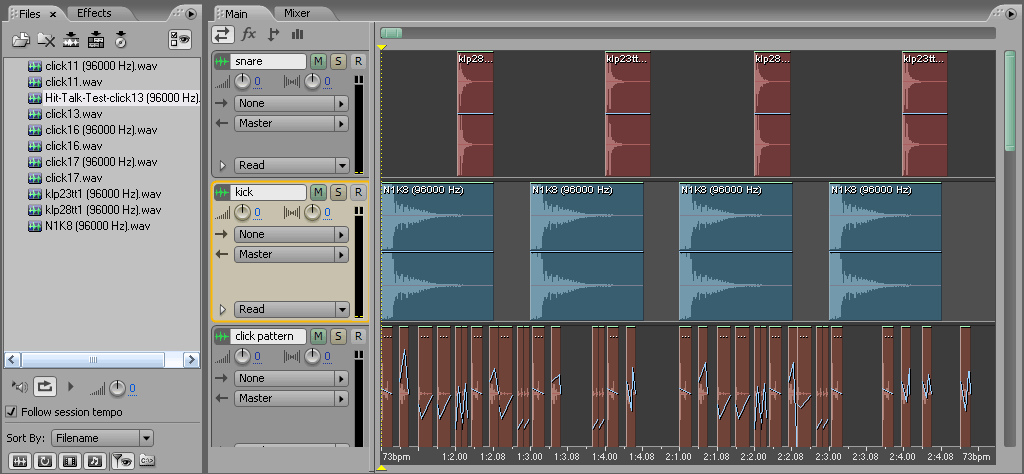 At left, is a 2-bar beat put together in Adobe Audition’s slick and satisfyingly intuitive sequencer. Pay attention to the kick and snare channels. The kick and snare follow what is widely considered the original rock beat: the most basic rhythmic pattern that a kit drummer can play. From this beat, you can learn the positions of the downbeat and the backbeat. It consists of a kick on the downbeat, and snare on the backbeat. The downbeat is the “1″ and “3″ counts of the bar, and the backbeat consists of the “2″ and “4″ counts of the bar. So counting “1, 2, 3, 4,” the rhythm consists of a simple “kick, snare, kick, snare” pattern. Rather than creating a straight 8th or 16th note ride pattern, we’ve spiced the beat up by arranging clicks and snaps taken from the Modernbeats Neptunian Drums 3 sample library on channel 3, making a few fast edits of the stereo image by clicking and dragging Audition’s easy-to-use clip envelopes. Though the clicks and snaps add interest to the beat, we need to heat it up bigtime. Changing the placement of the kick drum, particularly the second kick in each bar, will dramatically improve the beat’s groove.
Gin & Juice Beat: Second Kick Shifted Down
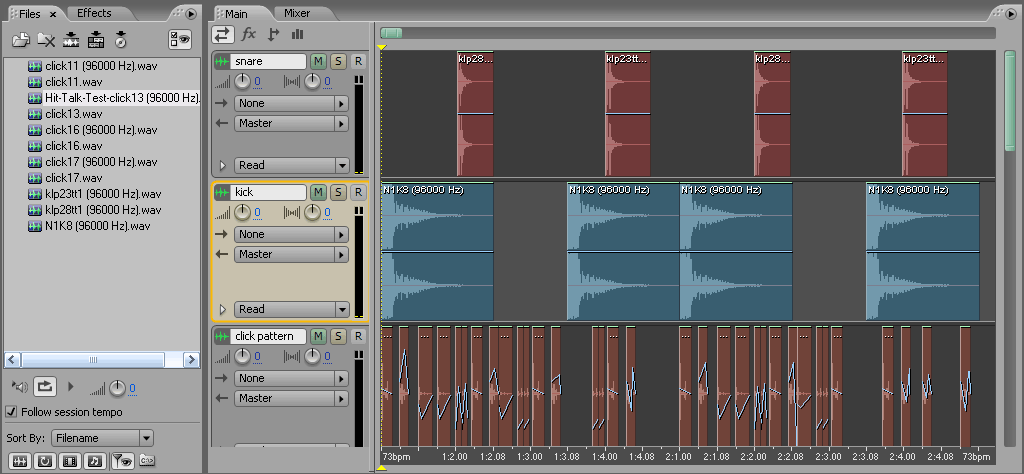 Snoopy’s Gin & Juice is one among countless classic Rap songs that uses a variation of the pattern you see at left. Essentially, we’ve shifted the second kick of each bar down the time line by one 8th note. The snare stays steady on the backbeat, but the delayed second kick gives the groove a nice, chilled vibe. Now the beat is beginning to show some soul. Though Gin & Juice contains a more complex kick rhythm, it is based on the same accents and feel as the rhythm we’ve shown you in the diagram at left. Counting the pattern in 8th notes (the bolded counts represent the kick), you get this: “1 & 2 & 3 & 4 &”. So, if shifting the kick down an 8th note creates a laid back beat, then what happens when you shift the kick ahead or earlier in time?
Second Kick Shifted Ahead
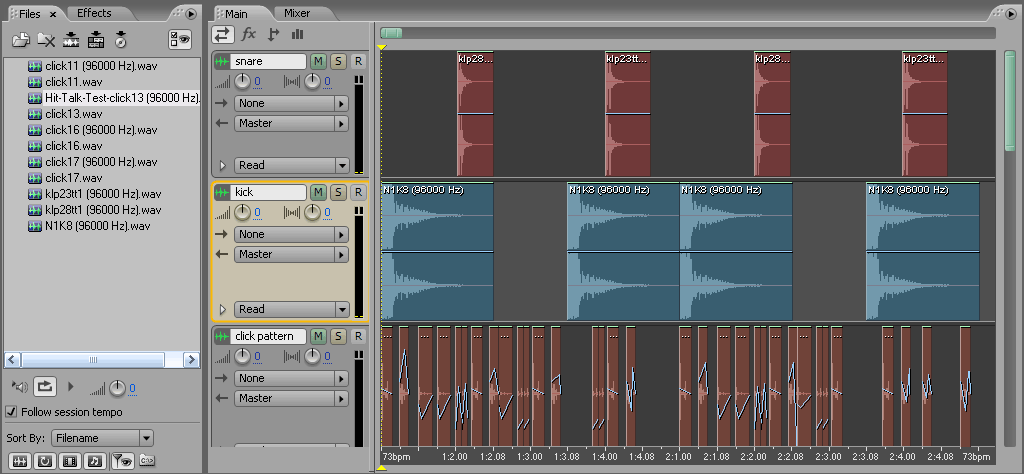 Let’s take another popular snoop joint as our counterexample. “Lay Low,” feat. Nate Dogg & Dre is a perfect example of shifting the kick ahead on the time line. If you shift the second kick ahead on the timeline, landing it on the 8th note before the downbeat you get this: “1 & 2 & 3 & 4 &”. Though it seems like such a small change, try comparing “Gin & Juice” with “Lay Low”. “Gin & Juice” is laid back, “Lay Low” on the other hand, is more energetic, and up beat. Part of the reason for that is tempo, part of the reason is additional rhythmic accents added by Dre, but the main reason is the placement of the kick. Where the kick goes, the rest of the song follows.

So above are two classic and time-proven patterns that you can use as templates for your own beat-making. They’re simple to understand and re-produce. Listening to the difference in feel of either pattern will program your mind to understand exactly how much the kick changes the feel of the beat. As Hit Talk expands, we’ll be covering increasingly complicated beat patterns and rhythms. So, stay tuned for upcoming examples that will further enhance your music production skills.
 GET 20% OFF COUPON INSTANTLY W/ SIGN-UP!
 Check Out Hot Artists & Music Producers discovered through Song Submit!



iwhich isthe best software on market forbeat production
is it not easier to create those beats in fl studio?
Hi Mike and Ian,
Thanks for the comments. Mike, I guess the short answer to your question is “yes.” FL has an easy-to-use drum sequencer, which is usually quite a bit simpler than piecing the drums together in a sequencer window. This tip article was intended to illustrate the importance of kick position, while supplying a couple of basic patterns that are, in fact, used in Hip Hop… Use any software you want.
That sort of answers Ian’s question. Sorry we didn’t get to you sooner, Ian. It would also be quite easy to use Propellerhead Reason to create those patterns using the straightforward ReDrum drum pattern sequencer. With regard to which is the “best beat production software”… well it’s like asking what’s the best truck? It depends on what your needs are.
If you don’t have any other software, Ian, you should pick a stand-alone production suite such as Reason or FL Studio (aka Fruity Loops). If you need something for drums exclusively and you want fast access to pre-programmed patterns (very convenient), then you might try a program like Jamstix, Battery, or Groove Agent.
If, on the other hand, you’re looking at using loopsets like the ones ModernBeats makes, Garage Band will give you adequate results. Ableton Live is quite possibly the most flexible loop sequencing software there is. Once you’re familiar with key commands, transposition, and stretching, you can create huge arrangements within minutes. It’s such a fast sequencer. Applying and tweaking effects is also extremely easy and gratifying in Ableton Live.
Anyway, all that to say… we didn’t use Audition because it’s the best, we just try to illustrate with a multiplicity of programs.
is this free?
Audacity is the free software… not to be confused with Audition.
can you print out your music?
I preciate the bangin info!! I’ve been practicin listenin to different tracks and tryin to duplicate using reason. My question is in Reason 4.0 how can i get a natural feel to the drums using the shuffle and groove remixer… Some of my tracks still have that rigid feel to em…
You guys picked up where scratch left us hangin..
Glad you’re digging it J-Meek. Does the remixer have a humanizing function? Also, you may want to think hard about which notes you’re accenting… A lot of times the rigid feel comes from notes that are dynamically flat. Try placing accents in logical places in the beat or melody by upping your midi velocities (or your clip gain) where the note or the clip lands on the counts (the 1,2,3,4), or whereever you think the strong beats should land. Then try backing off some of the other notes. This is why it’s so handy to have drum pads, and keys… Does that help?
how can some one change the sound of an instrument using fruity loops
ET, that depends on what you mean by “change the sound of an instrument”… Do you mean a guitar routed into Fruity Loops? Do you mean a VST instrument within Fruity Loops, Do you mean a recording of an instrument? There are multiple meanings to your question, and multiple answers for each meaning. But tell us what you mean, and we’ll answer best we can.
HTStaff
i mean a vst instrument
There should be a way to select presets in the top left or top right corner of the VST instrument window.
how can i make my tracks sound… more full.. seems when im listenin to em there is something missin.. i tried addin harmonys n effexs.. but it gets to where it sounds cluttered… maybe im not mixin it right.. plz help.. soo many questions to ask wish i could js im someone ha ha.. this is my link to further understand my dilema.. http://www.tightbeatz.com/artist.php?artist=A_Hood
what software is used to edit voice or vocals , making it sound like little wyne , what software do these guyz use
I always seem to be missing a major detail in the discussion of production techniques.
Please give me an intro to the basic elements of physics as they relate to electronic music. and what tool in Reason can I use to identify the frequency range of a clip/track?
Also, are musicians using the western based tonal scale or are they playing with the tuning options because there seems to be a lot of mind-bending music coming from computers and it feels like the tuning is creating the “bending”.
t
Yo Hood,
You should check out the latest tip, that might help. Sorry for the delayed response, but we were working on that tip when you wrote.
Definitely experiment with a parametric EQ during the mixing stages of your production. Try shaving off bass frequencies where they’re not needed. For example, a lot of the time, you only need the upper frequencies of a guitar track. The more you use an EQ to carve out each track, the more room you’ll have in your mix.
Have a read over our new mastering tip, that’ll help with your final masters. If you’re stuck for mastering plugins, check out the kjaerhus classic bundle.
Cheers.
dubz, you’re probably thinking of Autotune. Check out the Blame It Hit Report.
Hi Terese,
“Please give me an intro to the basic elements of physics as they relate to electronic music.” That’s an extremely tall order… tempting, but chances are if we wrote a quickly-improvized an introduction to audio physics in the context of electronic music, you wouldn’t understand it any better than our tips… we’ll consider publishing an article on it.
In Reason, a fairly good means of judging a certain track’s or instrument’s range of frequecies is to use the parametric EQ with a narrow bandpass set at high gain (a spike) and sweep it up and down the frequency range. You might do that to get a better idea of where to apply a lowpass or highpass filter, but really if you’re using a good monitoring system, you should just be able to use your judgement and your ears to shave off whatever frequencies are superfluous in a given track. (See our above comment)…
and finally, Even musicians who use the Western tonal scale bend their notes. Easy to do with a pitch bend wheel. If you’re noticing “ethnic” hints in the music you’re listening to, chances are it’s been inspired Eastern scales, all of which have very specific instructions for where and how much to bend your notes… That, like your physics question, is also a big can of worms.
Hi Hood, just a small hint to get better sounding drums: Use the right samples. E.g. in NI Battery you have some analog drums with and without room reverb. Those with room reverb are much more detailed and natural. Even the hip hop drums are full and nice. Of course you have to eq them because they are not ready for a full production. Sometimes you can just use a sample basedrum and snare and do the rest with stereo drums from battery or other stereo drums. Some drum loops in fruity loops ar also very easy to make and tight.
i want to make music and like make my own beats to write songs.
i want to learn how!
can you help me
Erica, have a browse through the hit reports and let us know if you have any specific questions.
Hey,
Was just wondering if it’s worth messing with the wave form when editing drum sounds and how difficult that is? I attended a lecture with Rob Swire from pendulum and he said that he regularly uses a process whereby an inverted a copy of the sample is used to remove certain frequencies from the original.
Hi Moc,
We’ve got a brief step-by-step on that process at this article: https://www.modernbeats.com/hit-talk/uses-of-audio-phase-inversio-using-cakewalk-sonar-producer-edition/
For most purposes, an EQ should provide a sufficient amount of gain reduction if it’s just a drum loop. When you say “messing with the waveform” did you have something specific in mind?
I have a bunch of drums kits that I can’t properly use in FL 9. Problem is..the drum samples sound different when I load them up into samplers then how they did when I auditioned them.In the sampler ,they sound high pitched. It seems the problem is tempo related.The one shot samples ( kicks ,claps ,snares ,etc ) have tempo information ( usualy something like 20 bpm , I found that out by hiting “Detect tempo” ), so when I load them into the sequencer ,they have a different pitch ,because I work at about 97 or 98 bpm.Is there a way I can mantain their original pitch without lowering the project’s tempo ?.
Can you please help ?.
20 bpm… if you’re getting that from hitting “detect tempo” then no wonder it’s sounding high-pitched. IF the drum samples are one shot samples, there’s no reason to assign tempo information to them.
You should be able to re-pitch the sample in FL, but you shouldn’t have to repitch every single sample. Image-line has a pretty informative website. You should try some of their tutorials
Have actually been into beat-making for about four years now basically, using FL Studio. I currently have full version 9. My problem is that I don’t always get the high quality sound patches thereby makin everything sound quite below HQ production. I don’t know if there are other options apart from purchasing sound patches and samples. Secondly, I’m working towards building a mini studio this year with a summed expense of 1000 USD. I need advice on the set of studio stuff this money can buy as the money will not be available at once taking note of equipment that I can easily upgrade in the future and not replace. Thanks
@ensky
You could always record your own samples and create your own patches… however you get them, good source sounds are the key. If you have good VST synths such as Minimoog V, and other high quality analog models (Audjoo Helix is a favorite), and if you have good quality samples like the ones provided by modernbeats, that are meticulously pre-produced for high sonic quality and ease of use, you’re further ahead. So good source sounds.
Then of course you have to have good EQ, good mixing, that’s the other part of the “hey man sounds tight, and hot” equation. Most Hit Reports can really help you there.
For a setup, make sure whatever your monitors are, you get a flat response and good representation in your bass frequencies. (BeyerDynamic DT-770’s are an OK temporary substitute for a tri-monitoring system), make sure your recording preamps are good. We still tout the Edirol UA-25EX - it comes with DAW software. has onboard compression and very good preamps. And a reasonably good large diaphragm condenser with pop filter and some kind of iso booth.
Great site and great info! Can you give an example of a decent affordable tri-monitoring system?
a yo is soundation a good music production software? can i produce hits with it?
Hello everybody,
I am new comer to computer music production. Though I am using FL Studio, Nuendo, Mixcraft softwares for my practice, I wanto to learn more and more about music production. I like very much hit talk site. Now, I would like to know from where I should begin with. I want to learn music production, recording, mixing & mastering with professional standard secrets. I am waiting for the right suggestions and directions. I hope this site will provide everythiing what I need.
Thanking you
Antharaala
Heya i am for the primary time here. I came across this board and I to find It truly useful & it helped me out a lot. I am hoping to give something again and aid others like you helped me.
Hello everybody,
I am new comer to computer music production. Though I am using FL Studio, Nuendo, Mixcraft softwares for my practice, I wanto to learn more and more about music production. I like very much hit talk site. Now, I would like to know from where I should begin with. I want to learn music production, recording, mixing & mastering with professional standard secrets. I am waiting for the right suggestions and directions. I hope this site will provide everythiing what I need.
Thanking you
Antharaala
im using FL Studio,Cool Edit and Cubase Sx for produsing music,but im not well enough with recording, mixing and mastering. what are basic knowledge to follow.
We do hip hop me and my partner and rnb we can make beats we record music to. We both can rap and sing we want to start samething big but start up capital is the probleme what can we do to get it?
Hello There. I discovered your weblog using msn. That is an extremely well written article. I’ll make sure to bookmark it and return to read more of your helpful information. Thanks for the post. I’ll certainly return.
Hi,
I stumbled upon this post very recently. I’ve been using Audition 3.0 for general recording, mixing and editing, while for creating beat patterns in FL Studio. The Most recurring issue I’ve faced is that the metronome/ tempo of the 2 dont match - i.e., if I have recorded the rest of the song at 80 bpm in Audition, then beat loops created in FL Studio at 80 bpm do not sync when imported into audition - turns out mostly they’re either very slightly faster tempo or slower. Is there a solution to this issue? Is there any suggestion for alternatives?
Pardon me if this issue has been tackled elsewhere.
thanks!
@Utkarsh: Host music software calculate BPMs at different rates & resolutions. You’ll need to go into the tempo preferences and make sure your 2 programs BPM divisions & resolution values match.
It seemes pretty confusing as to which beat maker is the best to use to make my own beats. I don’t have a lot of money, but still, will the cheaper beat makers really halp me make pro beats?
What about free beat makers like or Drumbox?
Confused
@Chris: FL Studio Fruity Loops offers one of the healthiest doses of features at a low price for musicians on a budget. Not sure if they still offer a completely free option.