




Pro One-Shot Sample Editing
Rap and Hip Hop music is full of chopping and sampling. Many Hip Hop producers - like Chuck D, J Dilla, and DJ Premier just to name a few - construct mixes by slicing out one-shot samples from existing third-party loops and songs, extracting brief sections of audio, and re-combining them into a remixed collage of sound. Audio editing software like Audacity, perhaps the best free audio editing program, makes chopping samples extremely easy. Because chopping samples within any software is so easy, it’s also easy to make a messy job of it. One distinct hazard of chopping one-shot samples is the audible tick. Not the little gray insect that gives you lyme disease, but the clicking or popping sound that occurs when a sample’s audio signal cuts off abruptly without decaying to 0dB. The tick, click, or pop remains audible because a producer hasn’t faded the chopped sample properly. To be fair, especially when discussing hip hop production, producers often keep sloppy sample edits that sometimes add a raw vibe to a beat’s sound, but let’s be honest: most of the time leaving in those audible artifacts is just plain laziness. Below we show you essential editing practices that will refine all your prized samples.
Step 1 - Highlight and Chop
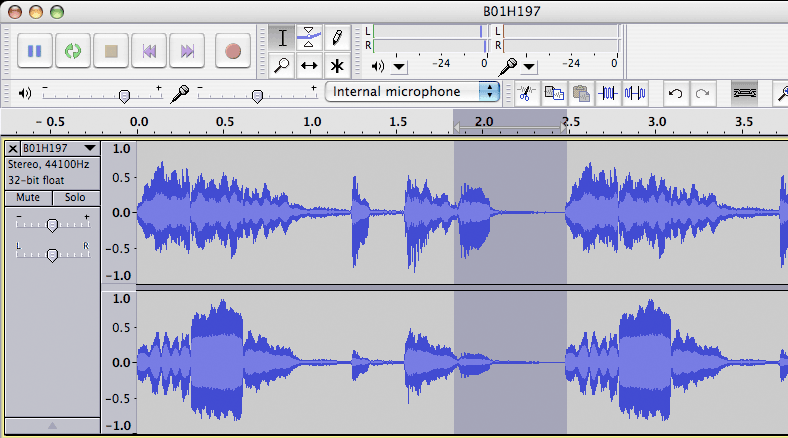 The sample we used, taken from ModernBeats Urban Anthemz 2, is called “B01H197.” Here we’re beginning to construct a new beat by slicing out the first brass hit of the sample. At left, we’ve highlighted the brass hit by left-clicking the mouse and dragging the cursor across it, taking care to include the whole sustain and attack. Now, we simply hit “Ctrl+C” or click “copy” in the “edit” menu at the top of Audacity’s GUI. This copies the desired slice of audio. Since we’re not using the rest of the loop, we’ll get rid of it by pressing the “X” button in the top left of the track. Pressing “Ctrl+V,” or clicking “paste” in Audacity’s “edit” menu places the brass hit at the beginning of a new channel, ready to be implemented in a sublime new beat.
Step 2 - Locate the Digital Artifact
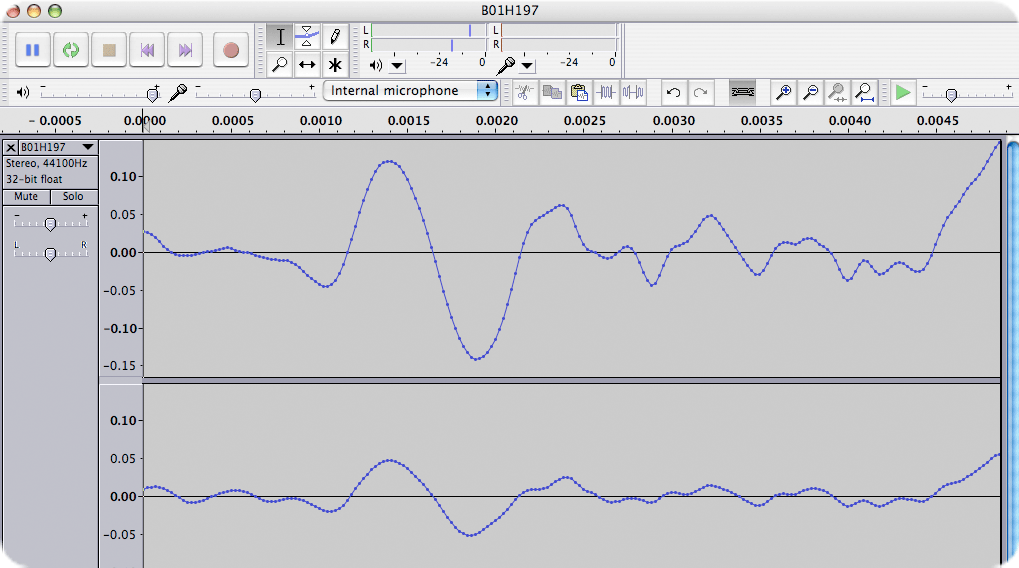 We’ve cut the sample at a spot where the wave amplitude is relatively high, hence there’s a good chance the sample doesn’t start at 0 dB. The result is the characteristic “tick” we discussed in the intro of this tip. Audacity is an extremely flexible software, and gives you numerous options for correcting problems like these. The “envelope” tool (the blue and white button next to the pencil icon at the top of Audacity’s GUI), allows easy creation of fades and mutes, the “draw” tool allows you to re-draw waveforms, but perhaps the best tool for microfading a one-shot sample is the “fade in” tool.
To use fade in, you’ll first have to zoom in on the sample. If you own a Mac, you can zoom in on the sample by holding “Cmd+1,” or “Cmd+3″ to zoom out, or you can press the magnifying glass icons at the top of the screen. At left, we’ve zoomed in to the very beginning of the sample, where, as you can see, the waveform does not begin at 0dB. This will cause an ugly interruption in the smoothness of this channel’s signal if it remains uncorrected.
Step 3 - Correct the Problem Using Fade In
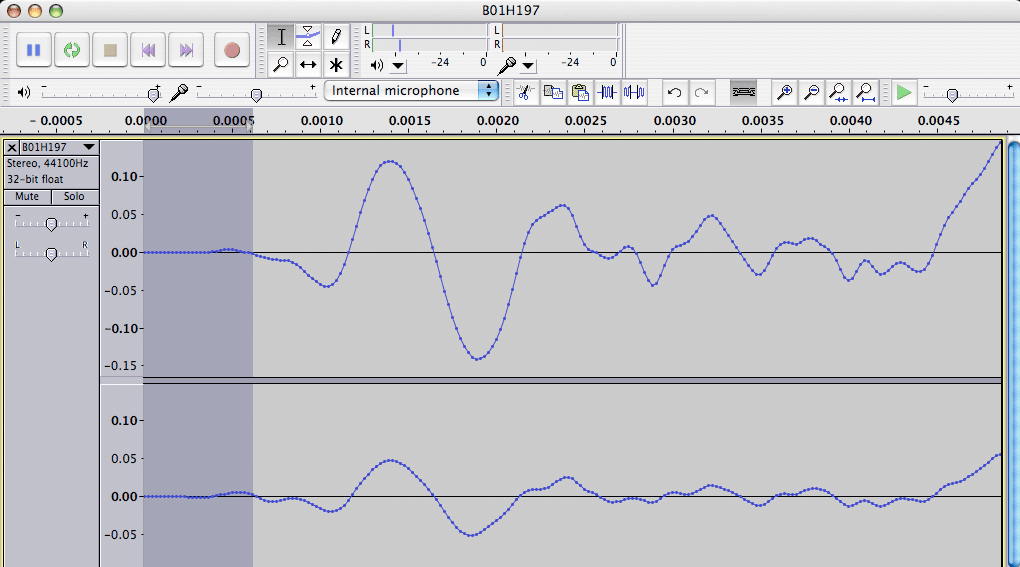 All you need to do now is highlight a very small piece of the sample’s introduction, go to the effect menu up the top and select “fade in.” Now your sample will look something like what you see at left. The end of the sample will need the same treatment; but be sure to apply “fade out,” rather than “fade in” to the end of the sample. In addition to editing the edges of your chopped samples, zooming in on your sample using Audacity will provide you with even more opportunities to clean up your sample. For instance, the waves in Audacity can be tidied up using the “draw” tool (represented by the pencil icon). If, for example, your sample contains unwanted transient clicks, you can edit those out simply by re-drawing the waveform while zoomed in. These, plus many more of Audacity’s free audio editing tools, make
 this software an impressive freebie, and a perfect beginner DAW. Any DAW is capable of the same technique of micro-fading is usually quite easy. Mackie Tracktion, for example, places an button on either side of every single clip in the Tracktion sequencer allowing for quick microfades. Armed with this knowledge, you’re now ready to produce pristine, glossed mixes. Whatever DAW you use, always remain disciplined and comprehensive when it comes to editing your audio files. Strive for uncluttered mixes, free of artifacts, polishing your productions so they shine.
*Many thanks to John Rutter of Essex, UK for supplying screen captures, and for writing the rough draft on which this article was based.
 GET 20% OFF COUPON INSTANTLY W/ SIGN-UP!
 Check Out Hot Artists & Music Producers discovered through Song Submit!



so can you send this lil song to lil wayne
vaper yaper im rideing in my scraper you know how i am lil j-paper i gets back in my scraper i go back to my house & i gets this lil paper ohhh you know who this lil j-paper
i am 12 years old
We can’t send it to Lil’ Wayne, Jahleel, but keep bringin’ the heat!
i dont like hw da voices in my recording sound, but i dont knw if its a hrdwr or software prob…m recordn in cubase sx3 the voices sound very thin compared 2 pro recordn i hear on cd nd radio. genre hphp.
Yeah, x, that’s a common complaint. Really the best recordings will come from a well-amplified, high quality microphone recording in a non-reflective environment like a sound booth. You might not be able to afford a recording set-up or recording sessions in a production studio, but for now, focus on your post-production; getting a solid finished project regardless of how the voice sounds. We’ve covered much of this in our Hit Theory ebook.
what’s the tightest way to sync an MPC4000 with Logic 8-I’m having trouble…please help
I’ve used Audacity to create remixes and mashups, and it totally rocks.
Pablo,
you may try an interface like the MOTU 8pre - Are you using all the outputs? You may also want to look at some of MOTU’s bigger interfaces by going to their website.
do u know any free wave editing programs that will work the same as the example uve give plus do u know a program that will take vocals off songs
If you take vocals off of songs, you get that vocal plus the background music. What you really want is an ‘ACAPELLA’. For example: Black Eye Peas acapella, (or) ‘Boom Boom Pow’ acapella. Cut out the sample you want.
Hi Chris,
If you’re referring to the tip example above then you can download that program for free hear. http://audacity.sourceforge.net/ Its Mac version. Also check out the tip on Audio phase inversion for taking vocals of songs. https://www.modernbeats.com/hit-talk/uses-of-audio-phase-inversio-using-cakewalk-sonar-producer-edition/ you’ll never be able to get a pure a cappella or instrumental but it might help you.
Peace.
This is off topic but I didn’t know where to ask. I have a Kontrol 1 as my recording interface and have a mpc and my Kontrol 1 outs all going into a mixer which is routed back to Kontrol 1 ins. Is it ideal to record sounds out of my computer back into my computer? I notice that when I record from the mpc alone I can higher levels in the recordings, but once I try to integrate sounds from my computer (drums specifically) I have to put up with a lot lower levels. Any suggestions?
I am using Fl studio 6 and would like to know how to use the program without running my cpu into the red. My specs are perfect but i”m struggling with plugins, they make my audio sound all choppy, i have an external audio interface (Edirol UA-25). Please help.
Hey Blackmajick,
It takes a good processor. Which plugins are you using? Some of them are really heavy on RAM. For instance, if you use NI Massive, you need oodles of RAM, and even then, it’s gonna sap most of your memory and processing power, depending on your system, of course. If FL Has a “freeze” function, use that. If not, you may be stuck bouncing your tracks. If it’s your effect plugins slowing you down, nothing beats a good DSP card, like the Universal UA-1.
how do i get to make stereo type beats of southern styles and can i get list of softwares southern producers use in usa. pls really urgent. and how do i get my cash after submittion of my hip pop beats. yeah thank you for all the comments and encouragement.
Southern producers will use anything from Pro Tools to SSL, to Cubase, to Nuendo… it depends on the producer. It’s not so much a question of what software you use, but how you use it.
Like sometime’s you’ll hear drumma chop the first syllable of a vocal and use an off-beat syncopated rhythm to make it stutter… To get your mixes to spread out and have a good stereo image, there are a lot of techniques. You may want to have a look at the AAY Stereolizer if you’re looking for a quick method, but also check out our other tips, we’ve got a couple on stereofying your mix.
The Southern Producers use many techniques that most other producers use. Good Southern music production is just good music production. You need to learn the same production tricks that every producer uses, you just need to learn the Southern style. Make sure you get reeeeeeeeall familiar with the MINOR scale. And variations of it, too if you want. Like, look up the spanish minor for example, and then start experimenting with it… if you want to get into southern style. Listen, emulate, modify, repeat.
Wish You Would is such a good southern joint, check that one out for inspiration - you’ve probably heard it. Hope that helps some.
what is the best tempo to make a crunk beat i am really good at the slow and singing type beats but once i start to make a fast beat it still end up slow.
i want a program i can use to download a softwear that i can use to extract instrumentals from music…….i want to use the instrumentals
Hey Ramcey,
Common question. Really what you need is a multi-track software and a parametric EQ. See section 3 of this tip:
https://www.modernbeats.com/hit-talk/uses-of-audio-phase-inversio-using-cakewalk-sonar-producer-edition/ (see comments above)
Some companies, like Behringer, make a voice canceller, but really a parametric EQ is probably the best gizmo. And remember this isn’t a perfect solution. A lot of the instrumental will disappear with the vocals. The only way to get the full instrumental is to find a section without vocals or - if you’re feeling up to the task - recreate it yourself
Cheers,
HT
what kind of sounds are important for an east coast vibe? like, i know its heavy on samples, but i want to know like, what kind of instruments, what genre of music are the samples from, what are some chords i should be familiar with, etc.
also, i have logic 9, but i’ve heard its hard to hook up MPC’s. i really want one though. should i upgrade to pro tools before getting one, or has it been made easier to connect?
That’s an excellent question. Try taking a real close look at Public Enemy’s work, song’s like “shut ‘em down”. The vibe of those tunes comes from the mix and mastering effects applied to those original samples, and the process by which it is procured. So for example, on a lot of old Soul and Motown cuts, you’re going to have analog EQ and compressors and all your channels summed onto tape… hard to re-create that. Just be careful with how much you use. Don’t use longer clips, cuz you have to pay for them… or sample from royalty free sources if you can find them…
As far as what chords you should learn, learn common Jazz and Soul chords… in context that is. so learn the progressions. If you’d like a reference, Herbaliser uses quite a concentrated dose of relevant chords (even though they’re not East Coast… Atlantic Ocean… close enough)
In principle, there shouldn’t be any thing more difficult about sending an MPC signal into logic than to Pro Tools. It depends on what you want to do with the MPC… if you’re just using the MPC audio outputs, either platform ought to work just as well.
are there any videos out there showing how to hook the mpc up with logic
I’m from South Africa and I wanna know, what makes hip-hop producers in USA, produce songs that is so outstanding and what music sofrwares do most of them use?
Well Joseph i’m from SA too……if you read up you’ll see that it’s all about practice,learning,discipline and most importantly patience.Just have fun with the software ur using and before long u’ll be a hitmaker
Hi, i am using fl studio 6 producer edditon. I am facing a problem whenever i am going to import wave vocal track or a song from beat slice, its open the whole raw vocal track or song but failed to play after few second it becomes soundless..what should i do? Please help me soon.
So how do you get samples from audacity into Reason 5 is my question.
You have to go through ReCycle, converting the samples to a format that the Rex player can read. That’s why you always here of Reason Rewired into a host software like Cubase, which is what most people do.
Hey, great article. I’m currently trying to sample some vocals from a few songs, and so far only one sample came out clean. I’ll change the pitch / tempo to match my instrumentals, and normally the sample will get all distorted and odd sounding. I’ll use the ‘paulstretch’ effect to make it ring out more, and that usually does the same thing. Does this sound like a hardware problem (soundcard?) or is there something I’m missing?
Long story short, I want to change the pitch, tempo, and duration of a vocal clip that I sample from other songs, but I’m having a hard time keeping it clean.
Thanks!
@Justin: It’s not a hardware issue. Sample-based time stretching and transposition has always been a challenge for maintaining sample quality. Some of the music software that is best at this task without hearing aliasing and other artifacts is Sony Acid Pro and WavLab. Other options are Peak Bias audio editing software and Waves plugins. Lastly, Apple’s Garageband tempo/pitch manipulation is as seamless as Acid Pro’s. Give those programs a try and compare qualities.