




Analyze Your Mix Visually
To mix a song correctly, and to build your audio mixing skills, there is nothing more important than a quality monitoring system. At Hit Talk, we’ve stressed this important truth over and over. Yet with today’s technology, we’re not just talking about aural monitoring. Coupling with visual monitoring can only improve your mixes. An ideal professional monitoring environment would consist of an acoustically treated room, near-field monitors, far-field monitors, a sub-woofer, plus a set of trustworthy visualizer plugins to ensure full mixing accuracy. Beginners often lack even the most basic tools, and their mixes suffer from obvious mistakes.
Mixing with a Spectrum Analyzer
If you have a rudimentary system, or even if you’re still learning to trust how your ear perceives the mix from monitors, you can augment your aural monitoring system with two simple visual aides. The first is a frequency analyzer. Many EQ plugins come with built-in analyzers. One free VST analyzer is Fre(a)koscope by Smartelectronix.
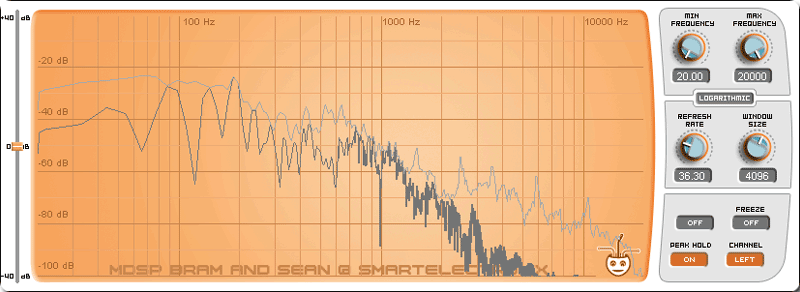
Pictured above is a mix created without proper monitoring. To have a look at how well-balanced the highs, lows and mids are, we’ve installed Fre(a)koscope as a VST plugin on the master channel. The gray line shows the average peak level of all frequencies on a specific track. the decibel level drops off toward the treble range. The producer probably used PC speakers, compensating for a perceived lack of bass by pumping it up, swamping the treble frequencies. On a well-balanced monitoring system or hi-fi system, the bass will be too much, the mix will lack detail, and any A&R official or producer who listens to it will kick it to the curb.
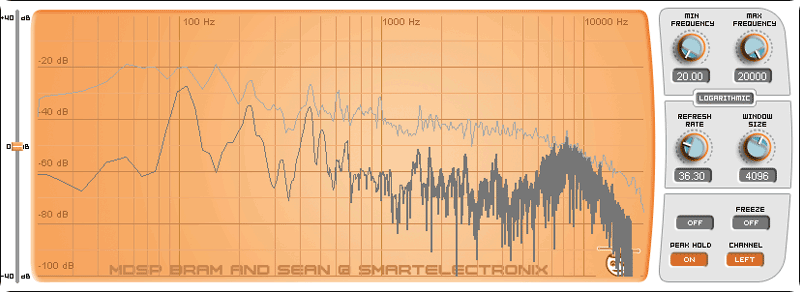
Above is a fully-mastered Billboard hit. The spectrum is even, and the bass frequencies are only slightly louder than the mids and treble. The gray peak indicator line shows a balanced spectrum. While there’s no replacement for quality monitoring, and a good ear, a spectrum analyzer like this provides a fantastic visual check on your mix’s frequency balance.

Using a Phase Scope to Track Stereo Image
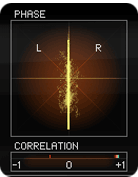 A second diagnostic tool you can use for your mixes is the phase scope. Some DAWs incorporate a phase scope, and you can download a free phase scope called Stereotool at www.fluxhome.com. Here, we’re using the phase scope from T-Racks 3. Essentially, a phase scope shows the similarity between the left and the right channels. If your mix is built from unprocessed mono samples, it will look something like the diagram at left. A complex stereo image should yield something like the diagram at right, and this is best accomplished using techniques we’ve explained in our other free online production tips.
The phase correlation, measured at the bottom of the scope should float between +1 and 0, if it drifts too far toward -1, you have too many frequency conflicts. By keeping your eye on the scope, and the phase correlation meter, you can judge the overall quality of your stereo image.
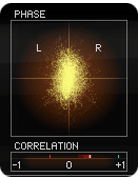 Pictured at left in the second phase scope diagram is a beat with a healthy stereo image. The phase correlation is still well above 0, and you can see that the stereo image is nice and wide. You can get a wide stereo image like this by panning, but using haas-style delay effects (delaying the left channel by a 20-30 (or more) milliseconds.
Always pay close attention to your mix, and make sure all of your samples occupy a position in a three-dimensional field of hearing. Pan and widen with diligence. One invaluable tool for efficient stereo imaging is the AAY Stereolizer, which uses a phase trick to create a stereo image. In every mix, give your listener a diverse landscape. Create space between the song elements by using positioning. Below, we’ll show you a little more on analyzing the frequency spectrum of your tracks. The phase scope pictured above is extremely precise and comes with T-RackS 3.
Mixing with a Multi-Track Spectrum Analyzer
Below is a shot of Bluecat Audio’s Freqanalyst Multi, an amazingly useful mixing tool. A producer can run multiple instances of the Freqanalyst Multi to track the frequency response of selected tracks in your mixing session. To identify which tracks are in conflict, you can compare them like we have in the image below.
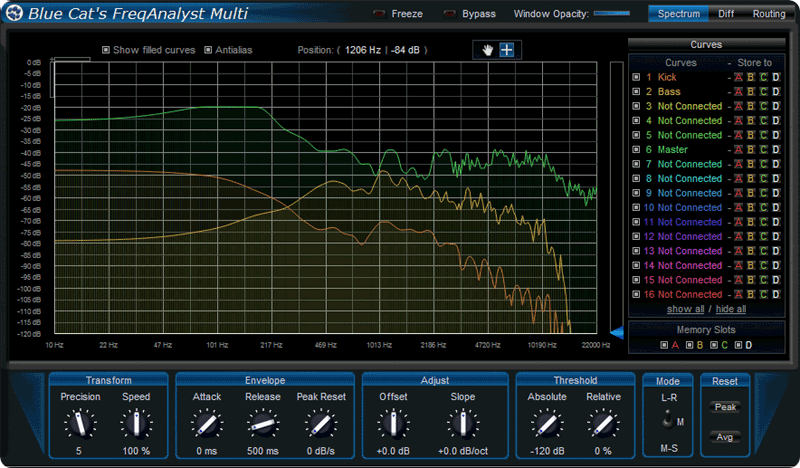
Take a song like “Nuthin But a G Thang,” on which we wrote our latest Hit Report. Since the song uses such a resonant kick sample, the bassline and kick drum both stand to conflict. When you’re thinking about how to EQ each channel, it’s important to consider which frequencies to duck and which to emphasize. Above in the Freqanalyst illustration, we’re analyzing the bass, kick, and the main mix. It is clear that the bass and kick share much of the bass frequency spectrum. There is a chance of frequency conflict. In particular, you can see where the frequencies peak between 50Hz and 250Hz. Lower the gain of either the bass or of the kick at that frequency by using a bandpass (bell curve) filter in your parametric EQ.
Pre and Post Compression Peak Visualizer
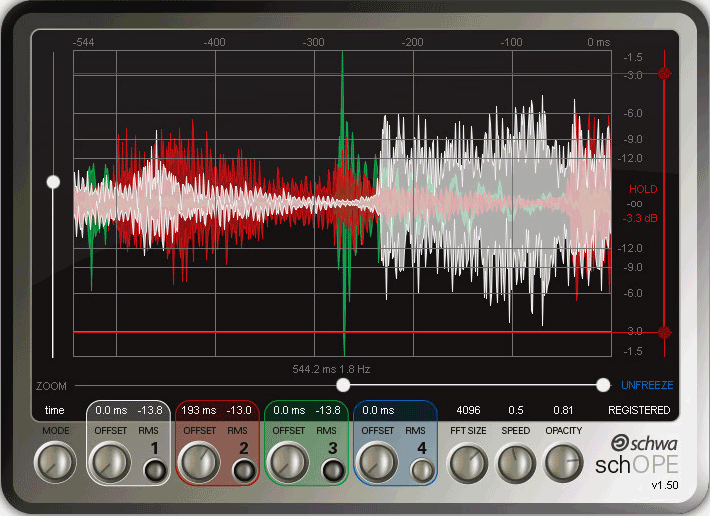 At left is probably one of the best all-in-one visualizer plugins you can find: SchOPE by Stillwell Audio. You can use this to analyze your signal both pre- and post- compression so that you can gage the effect your compressor is having. Is it limiting enough, or too much? is it mashing the peaks? In addition, SchOPE contains a spectrum display, and a phase scope.
Again, while these tools are handy references, there is no substitute for good ears. These techniques will allow you to judge your mixes on at least a few criteria without having to resort to extremely expensive monitors. If you’re still not sure about mixing, give these tests a try, see how your mixes stack up.
 GET 20% OFF COUPON INSTANTLY W/ SIGN-UP!
 Check Out Hot Artists & Music Producers discovered through Song Submit!



when i produce using fruityloops it’s always has lower output, the sound is not hard
compared to reason. pls i need help.
i also need help on step as regards production, mixing, mastering, recording etc. tanx a milion
The “hottness” of your overall output is all in the mastering stage. Check the previous tip on Mastering.
What Mastering plugins should I use for Mastering. eg Compressor,Equilizer etc.
i use fruityloops and cubase,i feel that my sound did not sound hard enough,i put a multicompressor on my output.can u help me.is this right the way i make it?
Yaslon and Rusiate,
have a read here:
https://www.modernbeats.com/hit-talk/mastering-audio-with-t-racks-3/
Study that, and try to generalize it to the equipment you’re using.
What do you choose in routing panel in freqanalyst multi? channels average, max? and in channels what you choose? peak, instant or average?
Can I use an amplifier and three way speakers instead of regular studio monitors?
Hey Nick,
Yes, you can. But “reference monitor” is literal: a reference tool by which you monitor the balance of frequencies in your mix. So… chances are your three-ways are going to have a frequency bias. Monitors are a bit like prescription glasses… the better you can see… the better you can paint or draw…
You bring up a good point though. Especially if you’ve maxxed your current budget out on your DAW, and all you can afford is the speakers you already have, these visualizer plugins can come in all the more handy… You can look for persistent spikes at certain frequencies, and correct your mix accordingly
Great stuff, thanx for the tip, i guess the 3ways will have to do for now until I’m able to get proper monitors
I’m really interested in knowing how to produce quality hip hop beats, in order to take my country’s hip hop industry to another level by improving it. but the problem is I don’t know how to download a free music software, can somebody please assist me in this regard?
Yall don’t know any of the basics of real production you broke the cardinal rule, always mix with your ears, thats why music is going down the crapper.
i need help on the plugins that can make my leading voice have weight
i want to start music production
how do i learn making tracks.
Speakfrom You should check out audacity.
@Sinister: Of course a producer has to mix with their ears. That’s why in the very first line of the article we say “nothing is more important than a quality monitoring system.” As for knowing the basics, our production speaks for itself.
@ AKDON - plugins aren’t going to help a mediocre recording. The best way to give weight to your voice is with a quality recording microphone.
@ kanyoro - you’ve come to the right place, have a look around the site.
… I av all equipment its takes 2 b a producer,i can produce beats but the principles of mastering is dark and black to me.can i get yah help.
how can i record a gospel choir ? wich voice will have more gain in the mixer,how many tracks by voice,how can i record chorus ?how can record soprano ,alto,bass,and tenor voices and how to pan these ,wich effects to put before recording
Hi Christian,
Some people record gospel choirs with two parabolic condenser mics hanging from the ceiling or from a very large stand… That way, the microphone only picks up what’s below it, and doesn’t pick up reflections from the ceiling or wall…
If you’re doing track on track, you might think about recording all your vocalists with a high quality condenser and a pop filter. Use a highpass filter or a rolloff to minimize rumble. You’ll definitely want to do that.
You might also want to think about arranging the choir on your mixer like you’d find them on a set of bleachers. That should be enough to get you started
@D’Raph - check out the rest of the tips section, and some of the G Thang and Morning After Dark report should be helpful
Hello
so im new to the whole music producing and wanted to know how to become a great mucisc producer.
i have had so kind of experience because i control the sound system at my church.
i guess my question is where do i start, where do i go to school?
thank you for your time
Hi Evans,
These two interviews will answer your question better than we can.
https://www.modernbeats.com/hit-talk/marcella-araica-hit-sound-engineer/
https://www.modernbeats.com/hit-talk/wayne-wilkins-keepin-it-simple/
-HT
How do I mix my 808 kick with my sub? They are always clashing with each other, I always have a problem when it comes to that. Can you give me an Ex.
jst wnt to knw which approuch is effective whn mixing a beat: deal with every element individual(eq, effects)? or put effects and eq’ing on the overall track?….and also if whether a good soundcard makes a difference in a qaulity of the beat?
Personally I try and stay away from frequency analysers as they don’t really tell you whats going on sonically. Two songs which look the same can sound very different! They are good, in my opinion, if a problem has been identified by ear, to quickly find and correct it. However I don’t think they should be relied on too heavily, it’s easy to get sucked in by them and forget about the music! I run Platinum Mastering and the only tool I rely on on a daily basis to show what’s going in is my ears!
My problem is monitors. soon as I get the money for them something else in my studio gives way. first the mic so I had to upgrade that. then the whole computer. Basically what I’m saying is that I’ve given up trying to make professional quality sounding music and now do it solely for my personal enjoyment (seeing how the music coming out nowadays suck to me, no offense to anyone here). But my question is I got 120 dollars what computer speaker system or any speaker system do you recommend that I can afford with that and how would I hook it up if it isn’t a computer speaker system.
oh and thanks for the opurtunities that you give here I do have some quality music that I do plan to submit so keep up the great work thank you for the tips and soon as i get that speaker system I will be spending money here thanks
My question is
the kick drums you have,
are they good enought to use on there own
or do you have to double up on the kicks,
in some cases.
@kent: good question. They’re good enough to use raw. Yes, you might think about doubling up on them if you have a very specific sound in mind. For example if you like the low ffrequencies of one kick, but prefer the treble attack of another kick, you might think about layering them for the sake of sound design.
Thanks for responding
you got my business for sure.
You talk alot about theory, eq, compression and sell high quality drums. I find alot of A&R only want that current sound of today and no variation from that norm. How about a gear list on a current hit?
@De: We deliberately avoid relying a gear lists. The reason is it is the fundamental techniques achieved through the gear that matter and stand the test of time. For “radio-ready” production tips & techniques, please consult our hit reports. This is what they’re for. What’s important is how you use gear, not the gear itself. Hits have been made using only top end gear and then hits have been made with a free copy of Fruity Loops. The easiest method to follow specific gear being used would be any new modules, fx, samplers, hardware, or otherwise receiving massive ProTools support.